Warde / User access reviews
Access reviews
a line manager can finish.
Campaigns are defined, scheduled and decided in ServiceNow. Reviewers keep or take away access in your ServiceNow portal, every removal is confirmed by the system that made it, and the evidence pack shows exactly what each reviewer saw.
Plain names, one decision at a time.
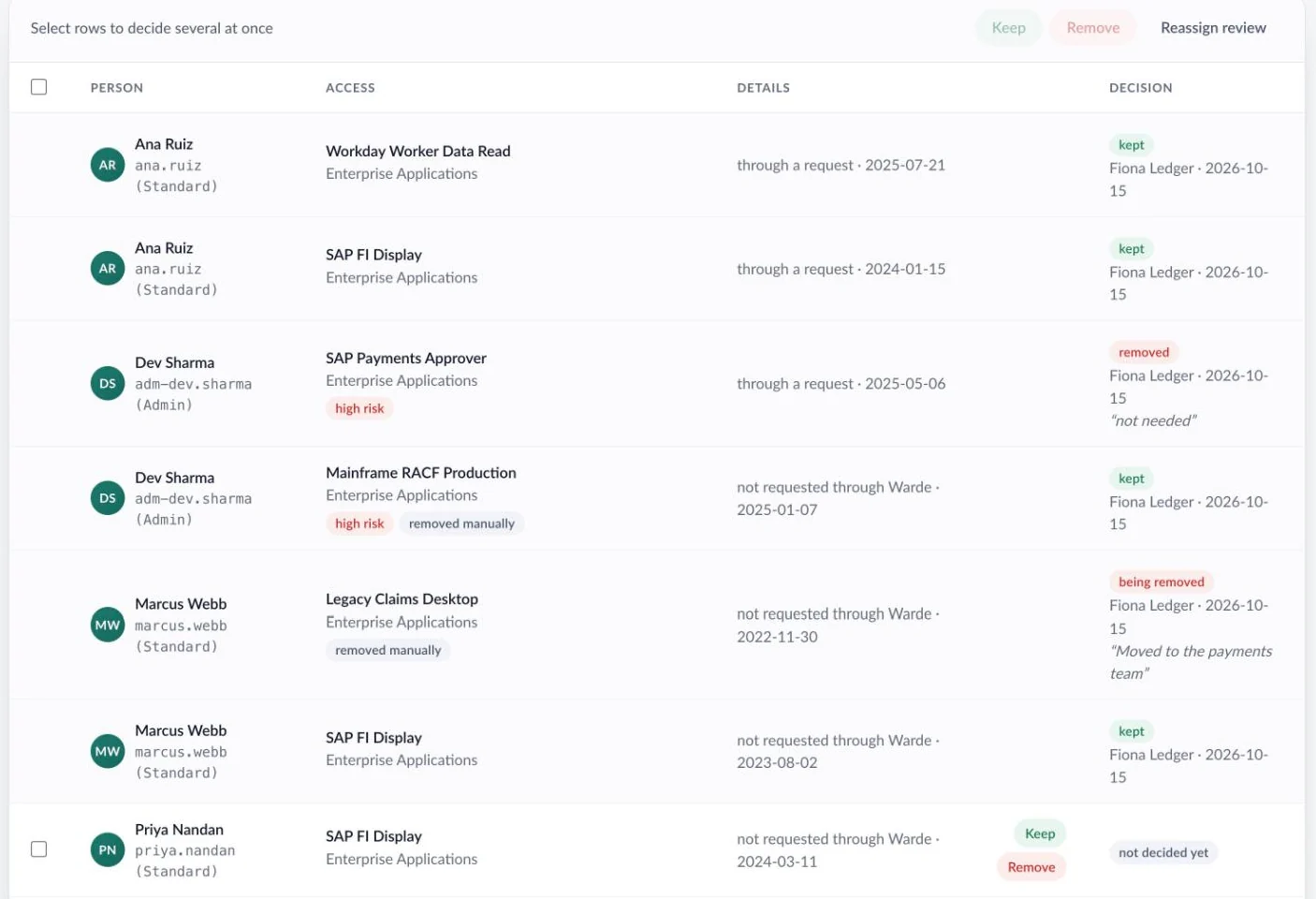
Every entitlement gets a plain name, an owner and a risk rating when its application comes on board, so a reviewer sees what the access lets someone do.
Every decision keeps its reason
Keep or take away one row at a time, or several at once. Each row says how the person got the access: a request, a bundle, a rule in the identity system, or added there directly. The reason is kept with who decided and when.
Reviews wait on their own tab
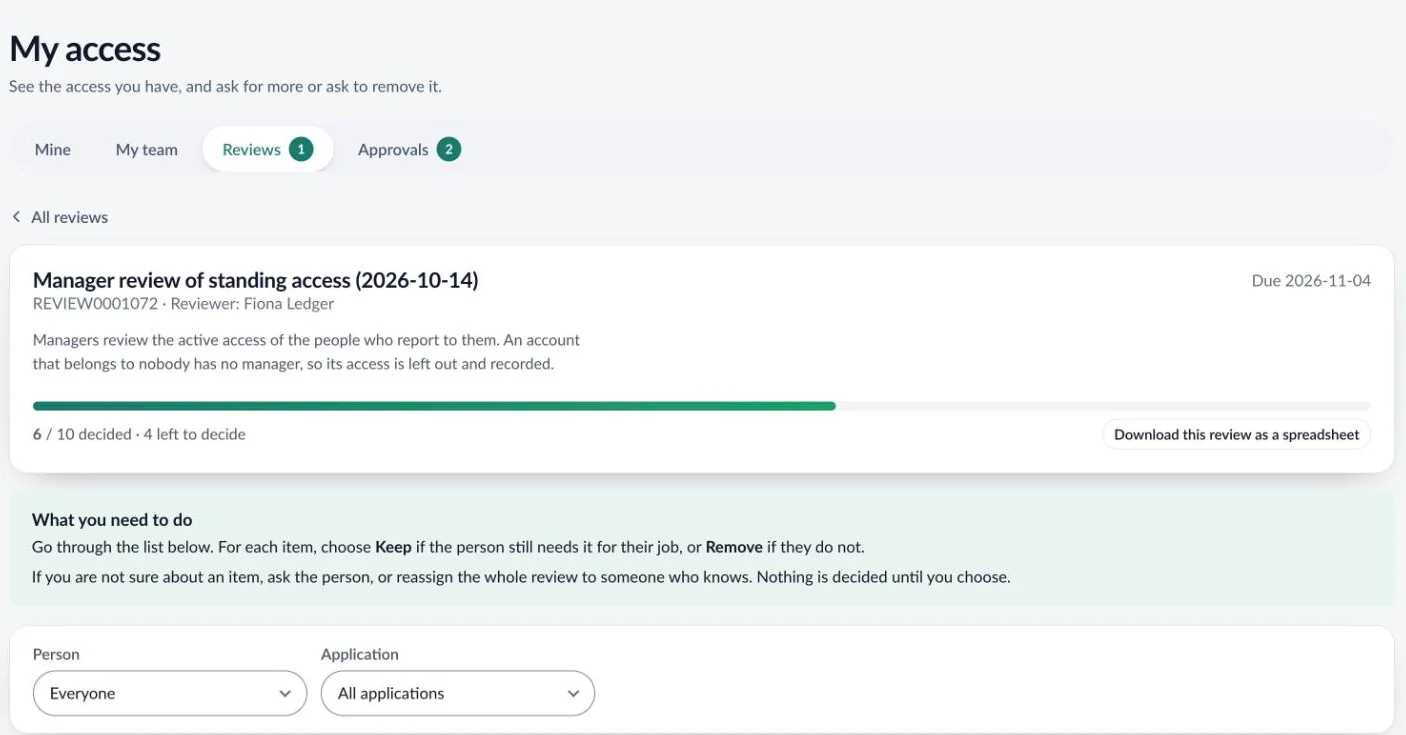
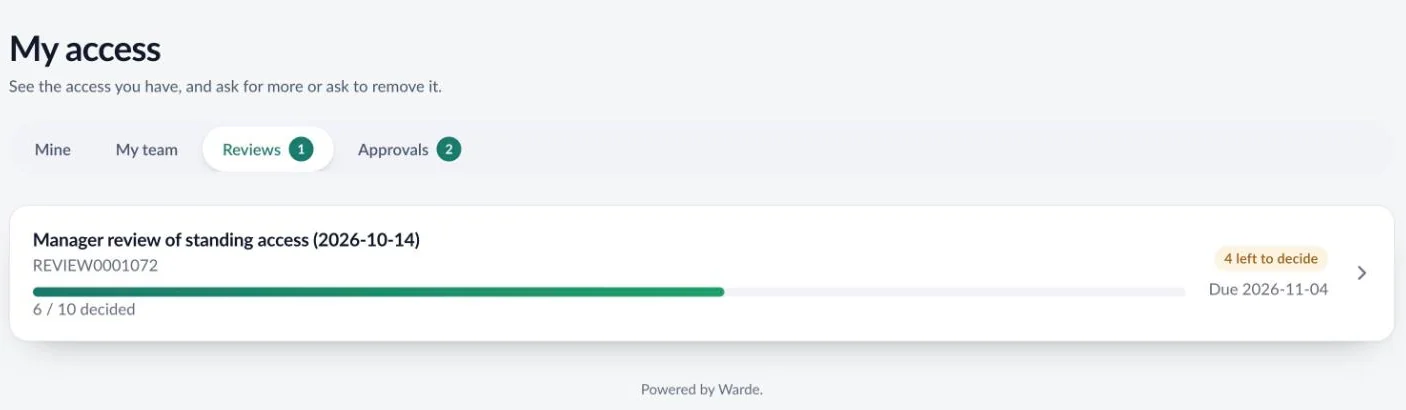
A manager sees each review with how many decisions are left and when it is due. A review that belongs with someone else can be handed over, and platform delegates are honoured.
Lines that explain themselves.
A reviewer never has to guess what a decision will do.
- A bundle that has changed
- The line says what Keep will add and what it will remove, so keeping it brings the person up to the bundle as it is now.
- Access the identity system gives by rule
- Left out by default, or shown marked can only be kept. You set it per engine, application or entitlement.
- Your own access
- Nobody decides a line about their own access, a Warde administrator included. The assigned reviewer decides it.
- Someone who has left
- The line is marked has left and drops out of the review the next morning. Your leaver process removes the access.
Campaigns that run on your instance.
No spreadsheet exports, and nothing to chase by email.
Scheduled
Once, daily, weekly, monthly, annually or on demand. Privileged access can run on its own, tighter schedule.
Reviewed by the right person
The holder’s manager, or the owner of the entitlement, application or bundle. Access nobody can review is left out, recorded, and counted before you launch.
Frozen at launch
Scope, reviewers and rules are captured the moment a campaign starts. It cannot close until every removal is confirmed.
Reminders, escalation and hand-overs.
You set the timings once, in Guided Setup.
Day 0
Launch
Each reviewer gets an email linking to their review on My Access. They have 14 days by default.
Before due
Reminded
Three days before the due date by default, then at that interval.
After due
Escalated
Three days late by default, the review goes to the reviewer’s manager, who can complete it.
Any time
Handed over
A reassigned review starts a full review period for the new reviewer, and the hand-over is recorded.
The evidence pack answers the auditor’s first question.
Was the list complete? Months later, nobody can show which query made a spreadsheet, or that nothing was dropped before the sign-off. The evidence pack can.
Read from the snapshot
Every decision with its reason, who made it and when, against the campaign as it was launched.
Rows that survive a rename
Each line keeps its own copy of the person, the account, the entitlement and how it was granted.
Removed, and confirmed
Each removal records the system that made it, that system’s reference and the confirmation.
Warde is not a GRC platform and keeps no control library. It produces the evidence for one family of controls. Every request, approval, removal and decision is kept as history nobody can edit, for seven years by default.
With SailPoint, Entra, Saviynt, Okta, or no engine.
With an identity system, Warde reads what people hold from it and sends each removal back to it. With none, access is imported and removals go as ServiceNow tasks to the team that owns the application. The reviewer screen and the evidence pack are the same either way. SailPoint · Entra · Saviynt · Okta
Questions about access reviews
Is a removal actually carried out?
Yes. A take-away decision goes down the same path as any removal, and reads done only when the system confirms it or the owning team closes its task complete.
How often should we review access?
Quarterly satisfies SOX, PCI DSS 4.0, ISO 27001, APRA CPS 234, DORA and NIS2. Run privileged access as its own campaign on a tighter schedule.
Do reviewers need a new tool?
No. They work in your ServiceNow portal, which they already use.
What about access nobody can review?
If the owner and the manager are both missing, the line is left out, an audit event records it, and the launch dialog tells you how many first. Nobody certifies access they know nothing about.
What if the owning team closes a removal task without doing it?
The access stays and the campaign does not wait. The line names the task and reads kept, and the evidence pack records it.
Can we review whole bundles?
Yes. A campaign can review bundle holdings, or only the people left on an older version of a bundle after it changed.
Can a campaign be stopped?
Yes. Cancelling closes its open reviews. Removals already sent still go ahead, and an administrator can cancel each one.
More of Warde
Bring last quarter’s review spreadsheet.
We’ll run the same review on a live instance and show you the evidence it leaves.
Warde is priced per user. Book a walkthrough or get in touch for a quote.